
Dante AVIO Adapters for Churches Explained
Dante audio networks can feel intimidating at first, especially for churches moving from traditional cables to networked audio. That’s where Dante AVIO adapters shine. Understanding Dante AVIO adapters for churches starts with knowing that these small boxes don’t replace your audio system—they help connect it together safely and simply.
This guide focuses on two specific AVIO models churches commonly use: the 1-Channel Analog Input and the 1-Channel Analog Output adapters—and explains when each one makes sense.
What Dante AVIO Adapters Do
Dante AVIO adapters act like audio translators.
They allow traditional analog, line-level audio devices that use XLR cables to connect to a Dante network using a single Ethernet cable. This lets churches keep trusted equipment while gaining the flexibility of networked audio.
Think of AVIO adapters as:
- On-ramps into Dante
- Off-ramps back to analog gear
They convert audio only—they do not mix, process, or amplify it.
Dante AVIO 1-Channel Analog Input Adapter
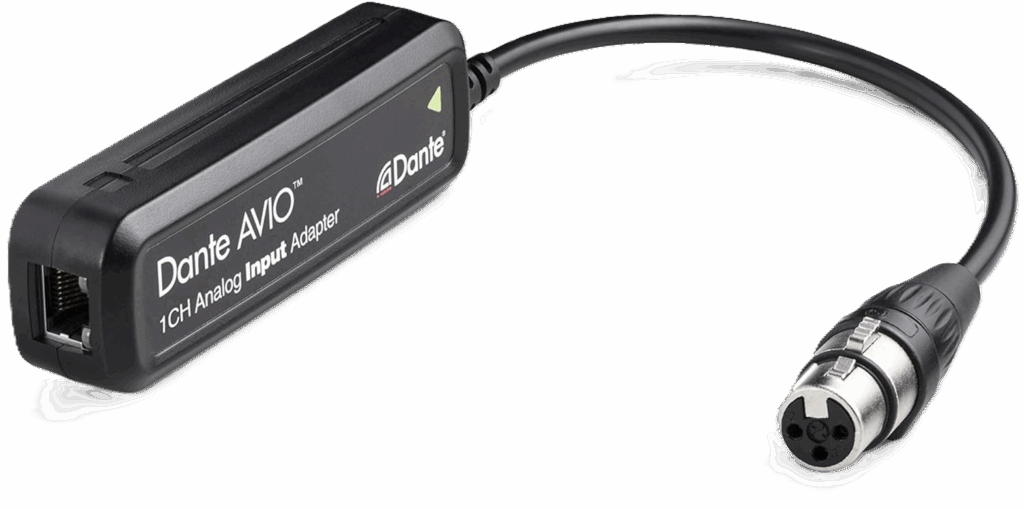
The Analog Input AVIO is used when you want to send analog audio into a Dante network.
What it’s designed for
- Accepts balanced line-level audio via XLR
- Converts that signal into Dante audio
- Powered by PoE (Power over Ethernet)
Common church uses
- Sending a mixer output into Dante
- Sending audio from a DSP or audio processor
- Bringing a playback device or DI output onto the network
Important note for volunteers:
This adapter is not a microphone input and does not provide phantom power. Microphones should be connected to a mixer or preamp first, then sent to the AVIO using a line-level output.
Dante AVIO 1-Channel Analog Output Adapter
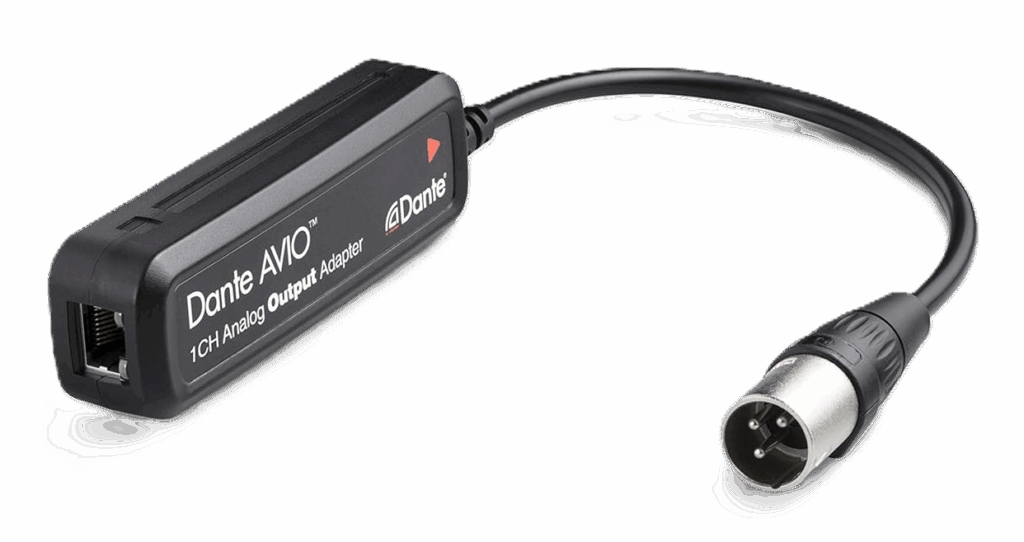
The Analog Output AVIO does the opposite—it takes audio from Dante and converts it back to analog.
What it’s designed for
- Outputs balanced line-level audio via XLR
- Receives audio from the Dante network
- Powered by PoE (Power over Ethernet)
Common church uses
- Feeding a powered speaker
- Sending audio to a lobby or overflow room
- Connecting Dante audio to a recorder, amp input, or assistive listening system
This adapter provides line-level audio only. It does not power passive speakers directly.
Power and Network Requirements
Both adapters:
- Use a standard Ethernet cable
- Require a PoE-capable network switch or PoE injector
- Do not use external power supplies
If your switch does not support PoE, the adapters will not power on.
Key Differences at a Glance
| Feature | Analog Input AVIO | Analog Output AVIO |
|---|---|---|
| Direction | Analog → Dante | Dante → Analog |
| Connector | XLR (line-level in) | XLR (line-level out) |
| Typical Use | Bring audio into Dante | Send audio out of Dante |
| Common Devices | Mixer/DSP outputs | Powered speakers, amps |
| Power | PoE required | PoE required |
| Channels | 1 | 1 |
Important Things Churches Should Know
- These are 1-channel adapters (stereo requires two units)
- Audio quality supports 24-bit up to 96 kHz
- All routing is done in Dante Controller software
- Gain structure still matters—set levels correctly at the source
Used correctly, AVIO adapters are extremely reliable and low-maintenance.
When AVIO Adapters Make the Most Sense
Dante AVIO adapters are ideal for churches that:
- Want to expand into Dante slowly
- Need to connect one or two analog devices
- Want flexibility without replacing working equipment
- Prefer clean installs over long analog cable runs
They are not replacements for Dante-enabled mixers—but they’re perfect companions.
Final Thoughts
Understanding Dante AVIO adapters for churches comes down to direction and purpose. The Analog Input adapter brings line-level audio into Dante. The Analog Output adapter sends Dante audio back out to traditional gear. Used thoughtfully, these small adapters give churches a safe, affordable way to expand audio flexibility without adding complexity or stress.
Check out our related posts:
- How to Connect a PTZ Camera to an ATEM Mini Using SDI Converters
- The Essential Guide: 4K vs UHD — What’s the Difference and Does It Matter for Livestreaming?
This post may contain affiliate links. As an Amazon Associate, I earn from qualifying purchases.