
AJA Kumo Routers Explained for Churches
As church livestream systems grow, cables can quickly become overwhelming. Cameras, switchers, recorders, projectors, and stream encoders all need video feeds—and constantly re-patching SDI cables is stressful and error-prone. That’s where video routers shine. Understanding AJA Kumo routers helps churches simplify signal flow, protect equipment, and grow confidently without jumping into complex broadcast systems. From my experience, it is often best to go a bit bigger than what you immediately need to plan for future growth.
This guide explains what Kumo routers do, how the 16×16 and 32×32 models compare, and when the hardware control panel is worth adding.
What Is an AJA Kumo Router (In Plain English)?
An AJA Kumo is a video routing hub.
Instead of unplugging and re-plugging SDI cables, a Kumo router lets you:
- Send any video input to any output
- Change routing instantly
- Keep gear permanently wired
- Reduce wear on connectors
- Avoid mistakes during live services
Think of it as a smart switchboard for video signals.
Why Churches Use Video Routers
Churches typically add a router when:
- They have multiple cameras
- Video needs to go to more than one destination
- Volunteers rotate week to week
- The system keeps growing
A router doesn’t replace a switcher—it feeds the switcher and everything else cleanly.
AJA Kumo 16×16: A Strong First Router for Growing Churches

The Kumo 1616 provides 16 SDI inputs and 16 SDI outputs.
Tip: Double-check the model number when shopping—AJA has several KUMO sizes, and listings can be easy to mix up. The KUMO 1616 specifically is 16 inputs and 16 outputs.
Why churches choose the 16×16
- Perfect for 3–6 camera systems
- Easily routes signals to:
- Switchers
- Confidence monitors
- Projectors
- Stream encoders
- Recording devices
- Compact and cost-effective
Best fit for
- Churches moving beyond direct camera-to-switcher wiring
- Teams that want flexibility without overbuying
- Racks with limited space
For many churches, the 16×16 is their first true routing backbone.
AJA Kumo 32×32:
Built for Expansion and Redundancy
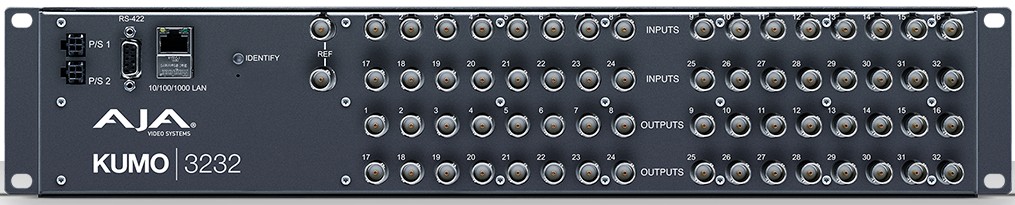
The Kumo 3232 doubles capacity to 32 SDI inputs and 32 SDI outputs.
Why churches choose the 32×32
- Supports larger camera counts
- Makes it easy to add:
- Backup switchers
- Redundant stream encoders
- Overflow rooms
- Recording backups
- Prevents future rewiring as systems grow
Best fit for
- Large or expanding churches
- Multi-room video distribution
- Teams planning long-term infrastructure
Many churches choose the 32×32 for headroom, even if they don’t use all inputs right away.
Quick Comparison: Kumo 16×16 vs 32×32
| Feature | Kumo 16×16 | Kumo 32×32 |
|---|---|---|
| SDI Inputs | 16 | 32 |
| SDI Outputs | 16 | 32 |
| SDI Standard | 3G-SDI | 3G-SDI |
| Best For | Small–mid churches | Growing / large churches |
| Expansion Room | Moderate | Excellent |
Both models offer the same signal quality and reliability—the difference is simply scale.
4K and UltraHD: Simple but Important Note
Both the 16×16 and 32×32 support ganged routing, meaning multiple SDI ports can be linked together to carry certain 4K/UltraHD signals when needed.
Most churches will use them for HD, but this adds future flexibility.
Controlling a Kumo Router: Software vs Hardware
Kumo routers include a built-in web interface for routing control.
Software (web) control
- Routing is done through a web browser
- Ideal for setup and occasional changes
- Initial network setup may use AJA’s small setup utility
- Less ideal for fast changes during live services
KUMO-CP 1RU Hardware Control Panel:
When It Makes Sense

The KUMO-CP is a physical button panel designed to control Kumo routers over the network.
Why churches add it
- One-button routing (no mouse)
- Faster changes during live services
- Easy for volunteers to understand
- Reduces accidental routing errors
Best for
- Teams with rotating volunteers
- Churches that change routing mid-service
- Environments where reliability matters more than menus
For many churches, the control panel is what makes a router truly volunteer-friendly.
What Kumo Routers Don’t Do (Setting Expectations)
Kumo routers:
- Do not mix video
- Do not add graphics
- Do not replace a switcher
They quietly manage signal flow so your switcher can focus on production.
Final Thoughts
AJA Kumo routers are an excellent mid-range upgrade for growing church production teams. The 16×16 model fits churches stepping into structured routing, while the 32×32 offers long-term flexibility and breathing room. Adding the KUMO-CP hardware control panel can make routing safer and easier for volunteers. When video paths are predictable and clean, the entire livestream workflow becomes calmer and more reliable.
Check out our related posts:
- Blackmagic 12G Videohub for Churches: 10×10, 20×20, and 40×40 Explained
- Getting Started with the Ross Graphite: A Church-Friendly Overview
This post may contain affiliate links. As an Amazon Associate, I earn from qualifying purchases.